What is a Normal Map?
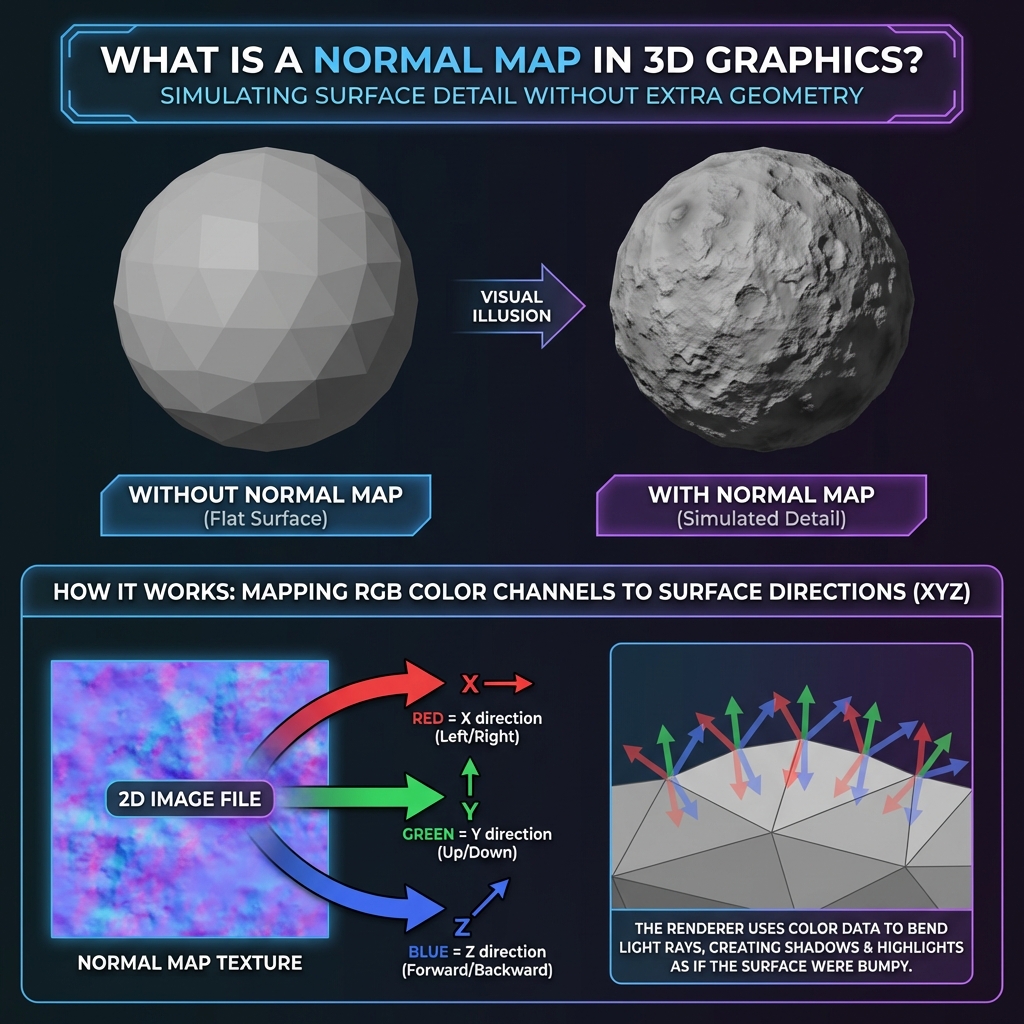
A normal map is an RGB texture that changes how light reacts across a surface, making a low-detail mesh look bumpy or grooved without adding geometry. It usually looks purple because the RGB channels store surface direction rather than ordinary colour.
The Problem: Polygons are Expensive
In video games, every 3D object is made of polygons (triangles). The more polygons you have, the smoother and more detailed your object looks. However, drawing millions of polygons is very slow for computers.
Game developers needed a way to make simple, low-poly objects look like high-detail objects without actually adding more geometry.
Enter the Normal Map.
The Solution: Faking Detail
A Normal Map is a special texture that tricks the lighting engine.
Imagine you have a flat wall. If you shine a light on it, the light bounces off evenly. Now, imagine you have a bumpy rock wall. Light hits the bumps at different angles, creating highlights and shadows.
A Normal Map tells the game engine:
"Hey, I know this surface is technically flat, but pretend light is hitting it at THIS angle
instead."
In Simple Terms:
A Normal Map doesn't change the shape of the object. It only changes how light reacts to it.
What a Normal Map Cannot Do
A normal map changes shading, not the model's silhouette or physical shape. Use displacement, geometry, or a high-poly bake when a detail must change the outline of an object or cast accurate geometric shadows.
How It Works (The "RGB" Magic)
You might wonder, why are normal maps always that weird purple-blue color?
It's not just a color choice. It's math stored as colors!
- Red Channel (R): Represents the Left/Right angle (X-axis).
- Green Channel (G): Represents the Up/Down angle (Y-axis).
- Blue Channel (B): Represents the Forward angle (Z-axis).
Since most parts of a surface usually face "forward" (towards the viewer), the Blue channel is the most dominant. This high amount of Blue mixed with the middle values of Red and Green creates that signature periwinkle/purple color.
Where to Get Normal Maps?
You can create normal maps in two main ways:
- Baking: Modeling an extremely detailed "High Poly" 3D model, and then projecting its details onto a "Low Poly" game model.
- Generating from Texture: Taking a height map or texture and using brightness as an estimate of raised and recessed areas. This works best when brightness represents surface height, not baked lighting or shadows.
Our tool specializes in the second method - generating normal maps from standard images instantly.